
AI Document Intelligence: Designing for Scale, Complexity, and Cognitive Clarity
A comprehensive case study exploring enterprise-grade AI interface design that balances automation intelligence with human decision-making in complex document processing workflows.
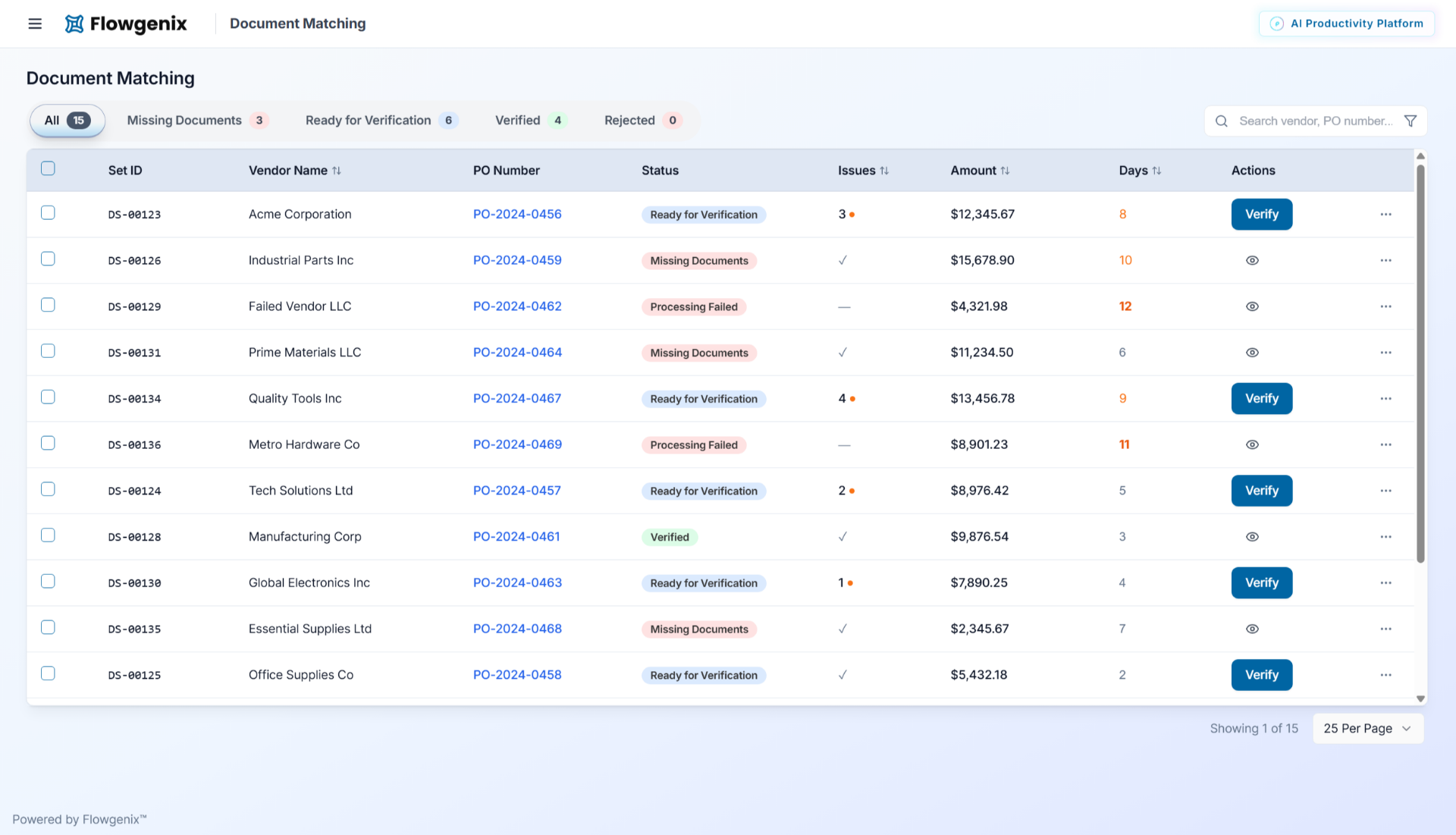
The Product Vision An innovative company approached Devnco to build an AI-powered document matching solution for the enterprise market. The product would handle complex document relationships across multiple industries, with invoice processing being one of many potential applications. Devnco brought Thirty Two North on board as their design partner to ensure the AI solution would be truly enterprise-ready.
We wanted to explore a more specialized collaboration for UI so that our core team could stay focused on functionality while ensuring the interface met high usability standards.
The UX Challenge: Enterprise Document Intelligence at Scale
The Real Design Problem: Building an interface that can handle thousands of documents with complex, multi-layered relationships while maintaining user focus and preventing cognitive overload.
This isn't about making AI "transparent" - it's about designing for enterprise-scale document processing where one purchase order can spawn multiple goods receipt notes, invoices, corrections, and replacements across different formats, vendors, and business scenarios.
Core UX Intelligence Challenges:
Designing for enterprise ERP systems requires balancing sophisticated functionality with user-friendly interfaces. Our challenge was creating an intuitive experience that could handle multi-million dollar procurement operations while remaining accessible to users across different skill levels.
Scale Without Visual Chaos
How do you present side-by-side comparisons of multiple document types without creating visual overwhelm? The interface must accommodate 1:many relationships (one PO, multiple invoices) while keeping users oriented and focused on what requires their attention.
Intelligent Attention Architecture
Not every variance needs user intervention. The design challenge is creating a visual hierarchy that distinguishes between critical business issues requiring immediate action versus routine format differences the AI handles autonomously. Users shouldn't be distracted by false alarms.
Contextual AI Diagnosis
When the AI flags something, users need to understand not just what's wrong, but why it happened, what business impact it might have, and what a correct scenario would look like - all without becoming AI diagnosticians themselves. The interface must translate complex AI reasoning into actionable business context.
Cohesive Error State Language
Creating a systematic visual approach to error detection, categorization, and intervention that works across different document types, vendor formats, and business scenarios. The interface must handle everything from missing fields to complex multi-document discrepancies with consistent, learnable visual logic.
Progressive Complexity Management
The system must accommodate both routine processing (which should be nearly invisible) and complex exception scenarios (which need rich contextual information) without the interface feeling fragmented or overwhelming.
Systematic Approach to Enterprise AI
Building enterprise AI interfaces requires methodical research, careful information architecture, and systematic design validation to ensure both usability and technical feasibility.
Enterprise Context Research
Understanding Scale Complexity:
Deep analysis of real-world document processing scenarios where one purchase order generates multiple interconnected documents across time, with variations, corrections, and business exceptions.
User Cognitive Load Mapping:
Studied how procurement specialists currently handle complex document relationships and where cognitive bottlenecks occur when processing hundreds of documents.
AI Capability Assessment:
Worked with Devnco's technical team to understand exactly what the AI could handle autonomously versus what genuinely required human judgment.
Information Architecture for Complex Relationships
Document Relationship Modeling:
Designed data structures and interface hierarchies that could handle complex business scenarios - partial deliveries, split invoices, corrections, and replacement documents.
Exception Taxonomy Creation:
Developed systematic categorization of different types of issues:
- Technical extraction failures (poor scan quality, format recognition)
- Business rule violations (price variances, quantity discrepancies)
- Workflow anomalies (missing documents, timing issues)
- Format variations (different terminology, layout differences)
Context Preservation Framework:
Architected information flow that maintains complete business context while focusing user attention on specific decision points.
Comparative Interface Architecture
Multi-Document Comparison Design:
Created interface framework that handles 2-way, 3-way, and n-way document comparisons without layout breakdown or visual confusion.
Field-Level Intelligence Mapping:
Designed variance detection system that shows not just differences, but business significance - distinguishing between critical discrepancies and routine variations.
Scalable Visual Language:
Developed consistent visual approach for highlighting, categorizing, and prioritizing different types of document variances across multiple simultaneous comparisons.
AI Diagnosis Translation
Business Context Integration:
Designed AI explanation system that translates technical detection results into business language - "Invoice total exceeds PO by 12% due to additional shipping charges" rather than confidence percentages.
Resolution Pathway Design:
Created guided workflows that show users exactly what corrective actions are possible and what outcomes to expect from each choice.
Learning Interface Architecture:
Built system that captures user decisions and improves AI recommendations over time, creating feedback loops that enhance both automation and exception handling.
Intelligence at Scale
View PrototypeCognitive Load Management System
Users processing hundreds of documents need clear mental models, not feature complexity.
Progressive disclosure architecture that reveals information complexity only when user intervention is genuinely required. Clean dashboard shows only documents needing attention, with detailed analysis available on demand.
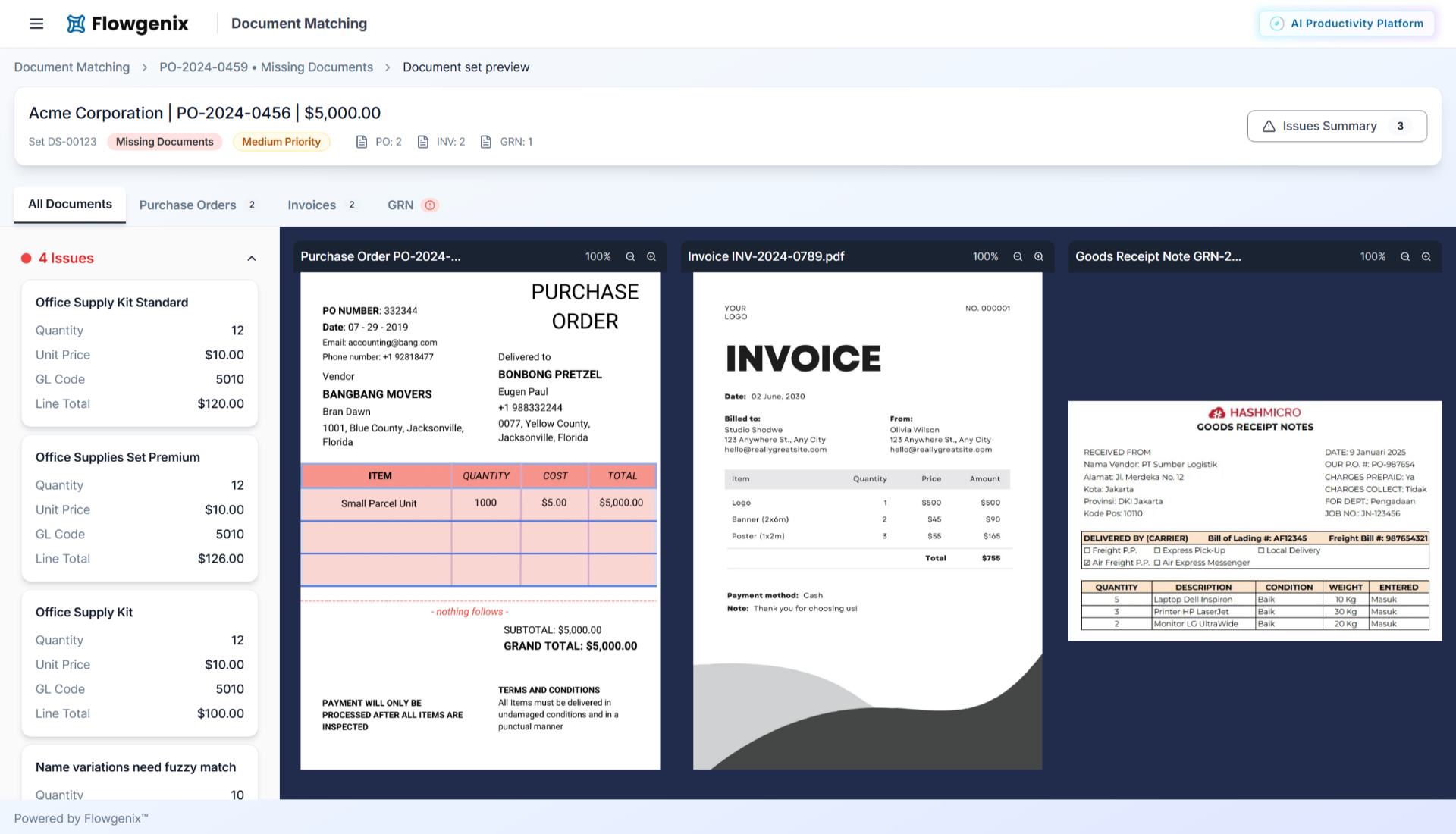
Systematic Error State Design
Different types of AI-detected issues need different user responses and varying levels of urgency.
Cohesive visual taxonomy that uses consistent color, typography, and layout patterns to communicate error severity, type, and recommended actions across all document scenarios.
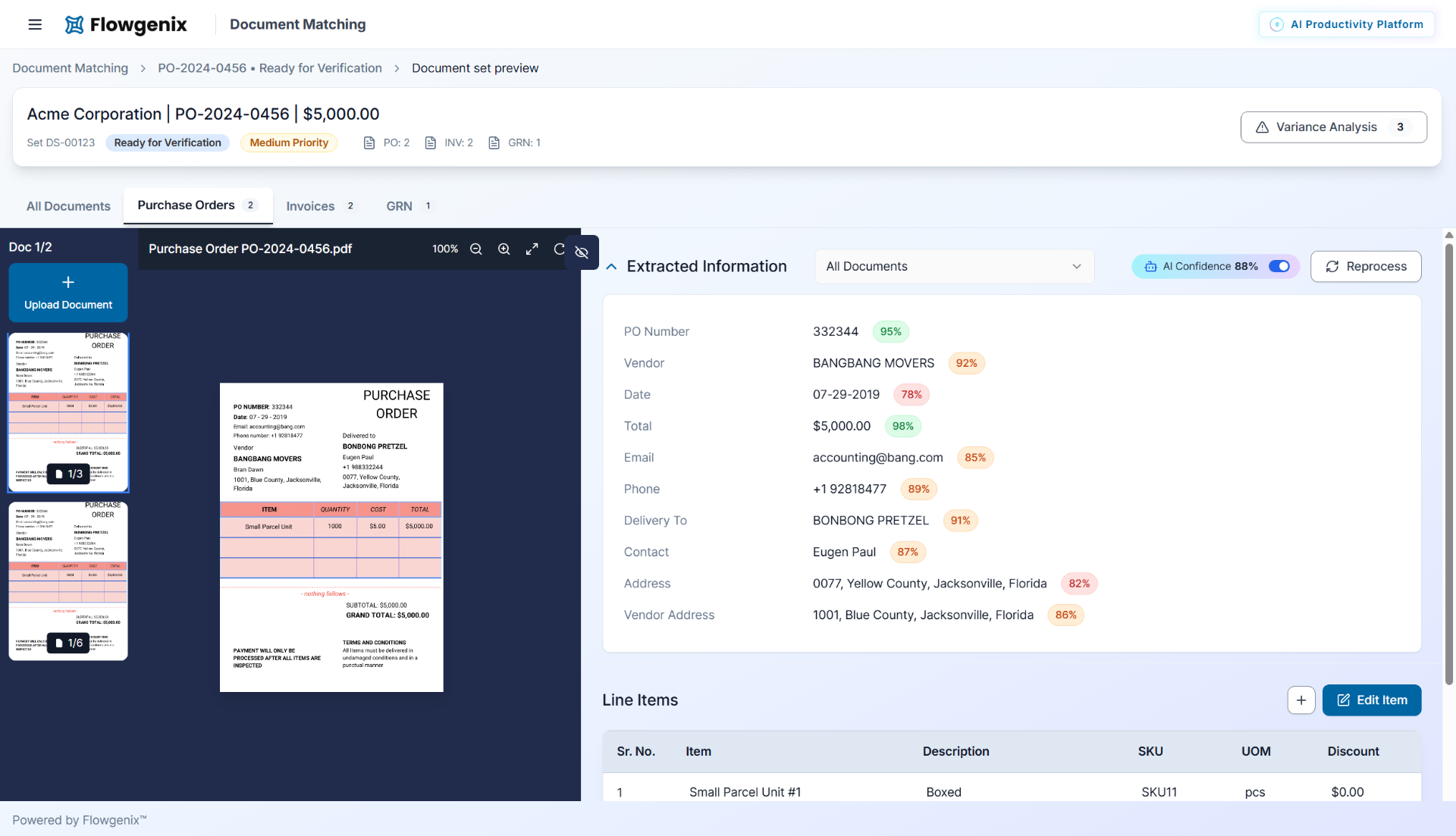
Context-Aware Assistance Framework
Users need different types of help depending on document complexity, their experience level, and current task context.
Intelligent help system that provides relevant guidance based on current document relationships, user behavior patterns, and historical resolution data.
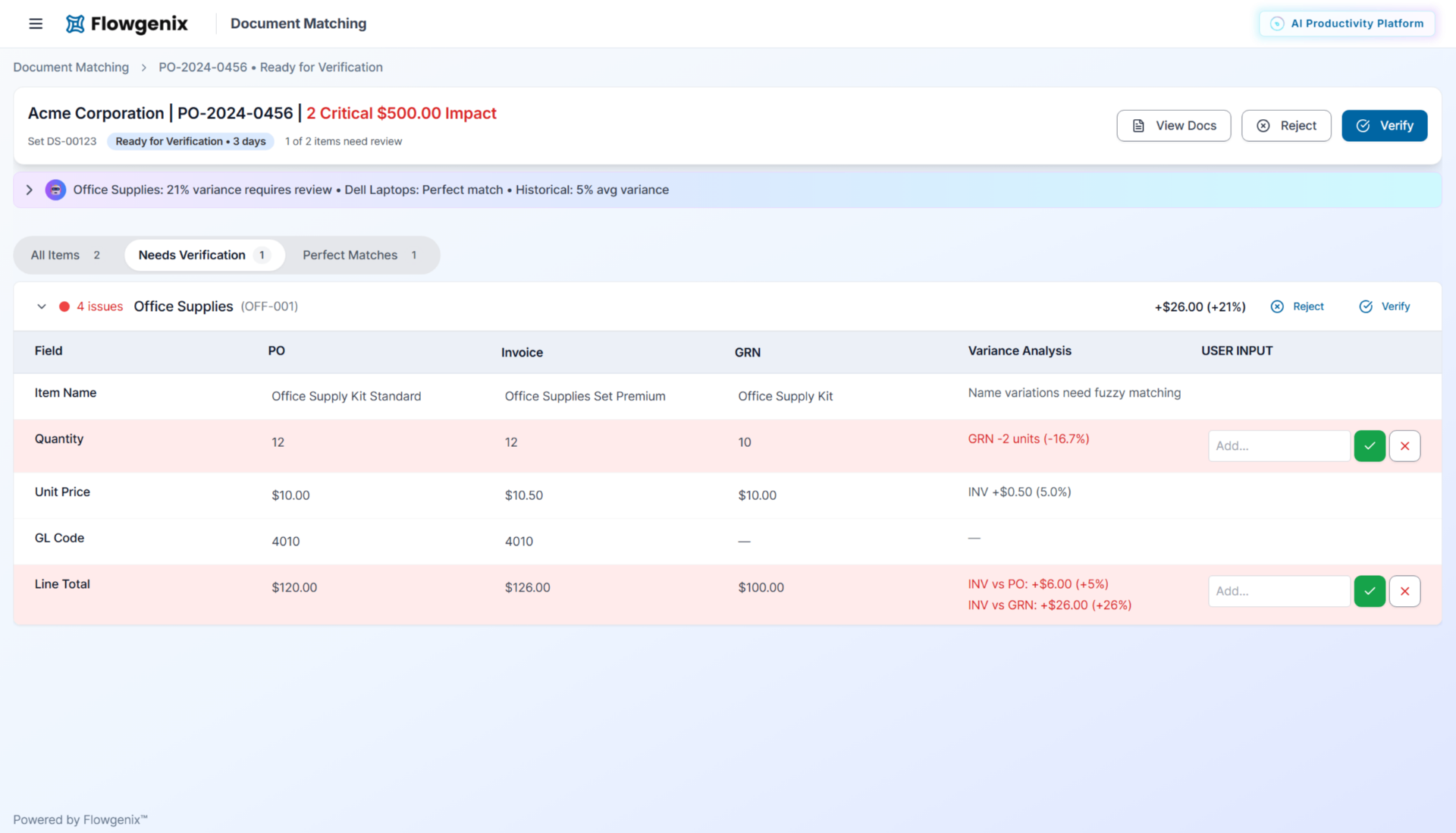
Relationship Visualization Architecture
Complex document families (PO → multiple GRNs → invoices → credit notes) need clear visual representation without overwhelming interface.
Hierarchical relationship mapping that shows document connections and dependencies while maintaining focus on current comparison task.
Design-Driven Development
Component Architecture for Scale
Modular Interface Design: Created reusable component library that handles different document types and comparison scenarios without custom code for each variation.
API-Informed UX: Worked directly with backend team to ensure AI processing results were structured to support optimal user experience rather than forcing interface to adapt to technical limitations.
Performance-Conscious Design
Large Dataset Handling: Designed interface patterns that maintain responsiveness when displaying hundreds of documents with complex metadata and relationship information.
Progressive Loading Strategy: Created user experience that feels immediate while handling enterprise-scale data processing in background.
Enterprise-Ready Intelligence
The systematic approach to AI interface design delivered measurable improvements in user efficiency, development velocity, and product quality.
Cognitive Efficiency Outcomes
Reduced Mental Overhead
Users process documents faster because interface eliminates cognitive noise and focuses attention on genuine decision points.
Systematic Problem Resolution
Complex document exceptions get resolved more consistently because interface provides systematic diagnostic and resolution frameworks.
Scalable User Experience
Interface accommodates growth from hundreds to thousands of documents without degrading usability or requiring user retraining.
Development Partnership Results
It was a huge time-saver. The plug-in-ready front end let our dev team focus on backend integration without worrying about design iterations.
Product Quality Achievement
The final UI fit in well with our Data Matching engine and elevated the product presentation. The team found it intuitive and easy to use, and our US-based client had positive feedback too.
Partnership Efficiency
Compared to working with a typical design agency, the turnaround here was faster and more aligned to our engineering needs.
Enterprise AI Principles
Scale-First Architecture
Design interface frameworks that handle complexity growth without structural redesign
Cognitive Load Engineering
Systematically reduce mental overhead through intelligent information hierarchy and progressive disclosure
Context-Aware Intelligence
AI explanations must translate technical detection into business-relevant insights and actionable guidance
Systematic Visual Language
Create learnable, consistent approaches to error categorization and resolution across all scenarios
Relationship-Aware Design
Interface must accommodate real-world business document complexity while maintaining user focus and orientation
AI That Thinks Like Humans, Acts Like Machines
View PrototypePre-Analysis Intelligence
AI screens documents before human eyes ever see them, flagging missing documents, OCR errors, and quality concerns that demand attention.
Smart Visual Comparison
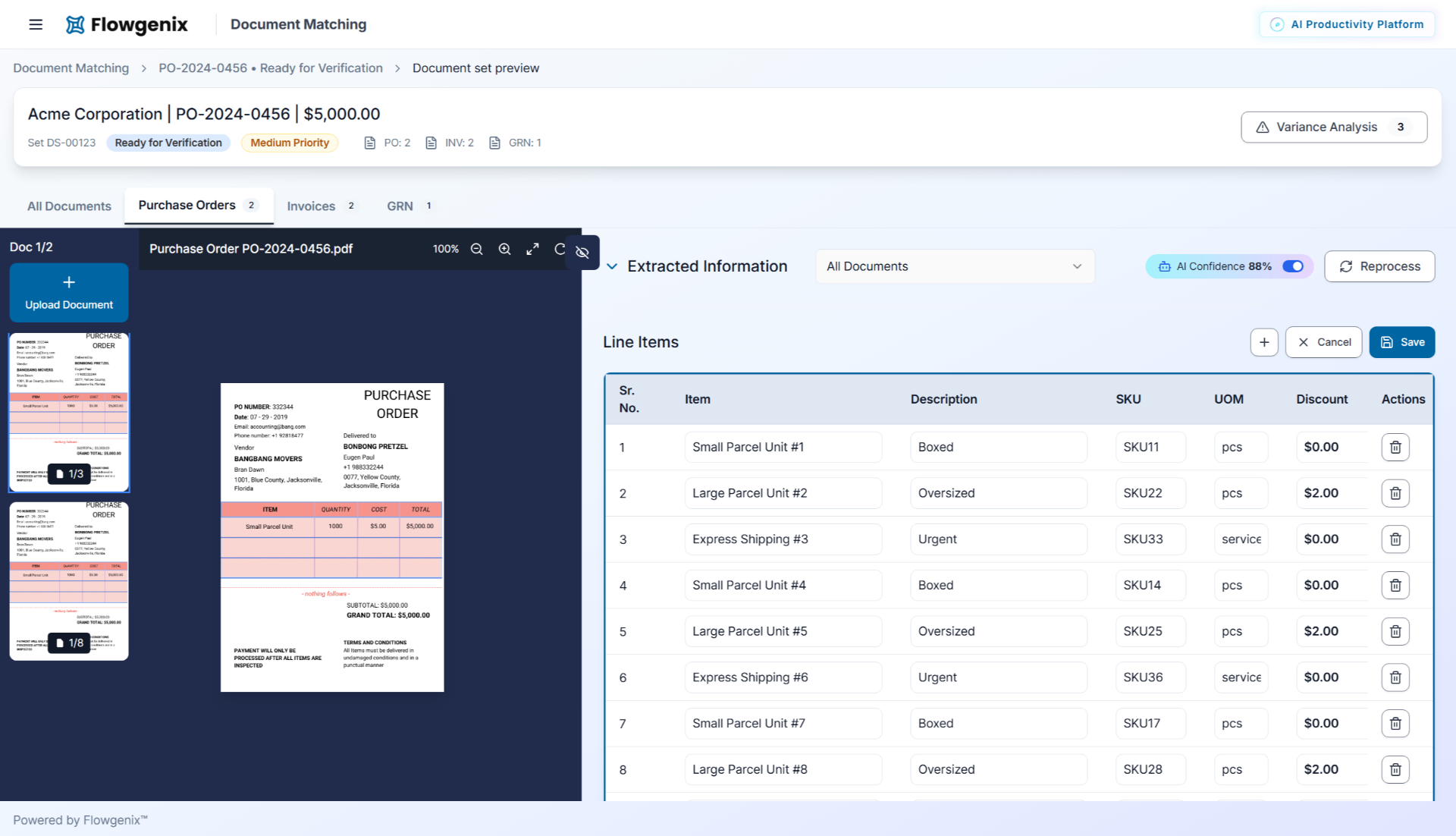
Interactive panels displaying extracted data that automatically pinpoint corresponding fields in document previews. No more hunting through pages - just hover and see.
Advanced Line Items Processing
Sophisticated line item editing interface with AI confidence indicators and seamless manual override options for complete control.
3-Way Matching Mastery
Comprehensive side-by-side comparison with real-time variance analysis, critical impact alerts, and AI-generated justification notes for complete transparency.
Embedded Technical Collaboration
Daily integration with development team to ensure design decisions supported both user needs and technical capabilities.
Systematic Design Validation
Rigorous testing of interface patterns under enterprise-scale load and complexity scenarios.
Iterative Intelligence Refinement
Continuous improvement of AI explanation and guidance systems based on user behavior and business outcomes.
The combination of structured design thinking, speed, and collaborative approach made it a great experience.
They already shipped with us
Ready to turn 11%
adoption into 68%?
Thirty minutes. We will tell you what is actually broken, and whether we are the right people to fix it.
We've told people to build internally when that made more sense.
We named it that for a reason.